Next week's Substack, decided and drafted in one sitting
You already make money on Substack. What to write, what's working and what's next still take your week.
Donna plans the week, drafts your essays and Notes in your voice, and schedules the Notes you approve. You stay the author.
"Ran our Donna session through a full audit on my end and walked away sharper for it."
Example week. Notes go to your Substack drafts with your times. Essays you publish yourself.
What testers say
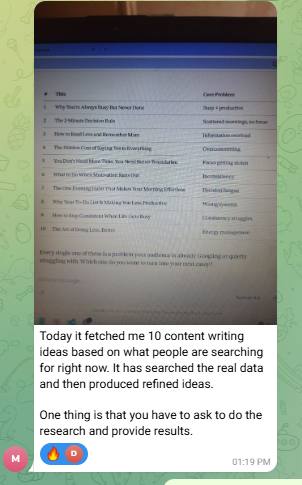
"Today it fetched me 10 content writing ideas based on what people are searching for right now. It has searched the real data and then produced refined ideas."
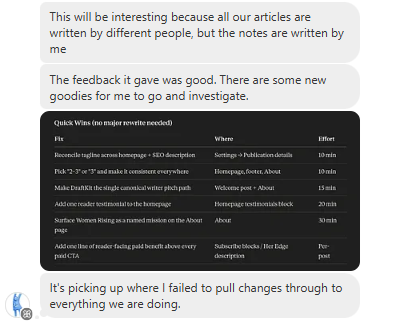
"The feedback it gave was good. There are some new goodies for me to go and investigate."
"It's picking up where I failed to pull changes through to everything we are doing."
"Mate — ran our Donna session through a full audit on my end and walked away sharper for it. ... Cheers for the tech, cheers for the rigor"
One sitting in Claude, three steps
A sitting is one session with Donna in Claude.
Open Claude. Your context is already there.
Donna loads your Creator Portrait from your Notion: voice, audience, strategy and past decisions. You do not re-explain your niche or paste in old posts.
Donna proposes next week. You decide.
She suggests what to write, says what is working from what she has read of your Substack, and drafts in your voice. Nothing moves until you approve it.
Your approved Notes get their times.
You approve the Notes and set the times in Claude. Donna saves them. One click in the Chrome extension puts them into your Substack drafts. Essays you publish yourself.
What you leave the sitting with
What to write: decided, then drafted.
Donna proposes next week's essays and Notes and drafts the ones you pick, in your voice.
What's working: named, not guessed.
She reads what you have published and what your synced Notes show people responded to. She does not open your Substack analytics dashboard.
What's next: chosen, then scheduled.
Donna proposes the next pieces from your portrait. The Notes you approve go to your Substack drafts with the times you chose, up to 60 at a time.
Kept in your Notion.
Decisions, drafts and plans become dated, searchable pages in your own workspace.
See a sitting
Set up once, then sit
You sit in Claude. Donna loads your Creator Portrait (your voice, audience and strategy) from your Notion. You approve. The Chrome extension puts your approved Notes into your Substack drafts with the times you set.
Start the trial.
Enter your email on the checkout. Nothing is charged for 7 days.
Get your link.
Your own Donna link appears on the welcome page right after you start.
Paste it into Claude.
In Claude, go to Settings, then Integrations (Connectors), choose Add custom integration, and paste your link.
Connect your Notion in Claude.
Notion's free plan is fine.
Optional: install the Chrome extension.
Install it and paste your API key. You need it to sync your Substack and to schedule Notes.
Run the one-time audit.
Donna reads your public Substack and builds your Creator Portrait. Then you run your first sitting.
Donna works with a Claude account. A paid Claude plan is recommended for full sittings.
How scheduling works
Substack schedules your Notes now, so you don't need a paid tool for that. It still won't tell you what to write on Tuesday. Donna takes the weekly planning off your plate.
She reads what you've published and what readers reacted to on your Notes, proposes next week, and drafts it. You sit down once and approve what you like. Your approved Notes go into your own Substack drafts with the times you set, and Substack sends them. You can edit or delete any of them before they go out. Then you get on with the writing.
You stay the author. Donna never publishes for you, never logs into your Substack, and nothing moves until you say so. The extension works inside your own browser, where you're already signed in. Her drafts start from your own published work, so you're editing something built on how you write, not starting from a blank page.
Readers can run what you publish through an AI detector. Donna's drafts are AI-written; what goes out under your name is what you approved.
Scheduling is for Notes, not essays. Essays are drafted with you and you publish them yourself.
Who Donna is for
For Substack writers who have already sold something: a paid subscription, a course, a coaching offer, a product or a sponsorship. You write under your own name. You want the weekly decisions and first drafts handled so the writing and the selling get your time.
Not for first-year writers who have not sold anything yet. Donna is worth paying for after a sale has happened.
Questions before you start
I'm not technical.
Setup is: paste a link into Claude, connect Notion, follow the guide. If you can send a Substack email, you can do it.
Do I need to pay for Notion?
No. Notion's free plan is fine.
Do I need a paid Claude subscription?
No, but recommended because usage limits on the free plan can cut a long sitting short. Never tested on ChatGPT.
Will it sound like me?
Donna builds a voice reference from your published work. It will not be perfect on day one. It gets better as your portrait fills in.
Is my Substack password stored?
No.
What do you store?
Your email, your credit balance and usage. Notes and drafts your extension syncs are kept for 24 hours. Notes you approve for scheduling are kept until your extension pushes them, or 60 days at most. Your Creator Portrait, plans and decisions live in your own Notion, not on our servers.
How do credits work?
You get 250 credits when you start and 250 more each month. An audit or a full essay costs 3. A Note, hook, plan or strategy check costs 1. Getting started, logging a decision, reading your Substack sync and scheduling Notes are free.
What if I cancel?
Cancel anytime from Gumroad. Access and credits end. Everything in your Notion stays yours.
$30 a month
$30 a month
7-day free trial. Then $30 a month. 250 credits on day one, 250 more every month. Cancel anytime.
Runs in your own Claude account; a paid Claude plan is recommended for full sittings.
Start your free 7-day trial
Sit down once. Leave with next week decided, drafted and your Notes scheduled. Nothing is charged for 7 days, then $30 a month. Cancel anytime.
What Donna is not
- Donna does not choose what to post. She proposes and drafts. You decide.
- Donna schedules Notes only. The extension puts approved Notes into your Substack drafts with the times you set, and Substack sends them. Essays are not scheduled, and Donna does not post for you.
- Donna does not open your Substack analytics dashboard. The extension syncs your drafts and published Notes.
- Donna does not replace your judgment. She takes the weekly decisions off your plate.
- Donna does not write without context. The one-time audit is required first.
Donna vs the tools people actually use
Honest side-by-sides. What each tool does better, and where Donna is a different job.
- Donna vs WriteStackQueue, research, and analytics. Donna is the weekly decision in Claude.
- Donna vs SubflowAICheap batch scheduler. Donna is the decision layer, not the $10 queue.
- Donna vs NarrareachMulti-platform desk. Donna is Substack-only and Claude-native.
- Donna vs EdenEight platforms and research. Donna is the Substack sitting.
- Donna vs StackSwellerFlat-price cloud queue. Donna decides before anything is queued.
- Donna vs StackBuddyFree plan and creator network. Donna is the strategy sitting.
When Donna is a real alternative, and when it is not
Who should switch, and who should stay on the tool they already have.
- WriteStack alternativeSwitch if the queue is fine and the weekly decision is still the tax.
- SubflowAI alternativeSwitch if you want the decision in Claude, not only batch Notes.
- Narrareach alternativeSwitch if Substack is the home and multi-platform is secondary.
- Eden alternativeSwitch if you do not need eight platforms.
- StackSweller alternativeSwitch if unlimited Notes was never the bottleneck.
- StackBuddy alternativeSwitch if free scheduling is not enough.